JDK Installation


JDK Installation


 Download Java Development Kit 16 (JDK 16) from this link.


In this tutorial I will be installing JDK 16 as this also installs JRE 16.


System specification:

Operating System: Windows 64-bit operating system, x64-based processor

Processor: Intel core i3 64 bit

Step – 1:

Double click the jdk-8u25-windows-x64.exe icon as shown in the below screen shot:


Step – 2:

The first screen you will see is the setup welcome screen as shown in the below screen shot. Click Next button.


Step – 3:

In the next screen you will see custom options like selecting the necessary features and the path at which we want to install JDK8. Leave them in their default settings and click Next button as shown in the below screenshot:


Step – 4:

In the next screen you can select the path at which JRE8 can be installed. Leave it at its default path and click on Next button as shown in the below screenshot:


Step – 5:

In the next screen you can observe the installation progress (green bar) as shown in the below screenshot:


Step – 6:

Next you will see the installation completion screen. Click on Close button as shown in the below screenshot:


That’s it! You have installed JDK8 successfully on your machine. 🙂


netaji gandi Wednesday, March 31, 2021
Exercise -4 (Inheritance)

 Exercise -4 (Inheritance):

a) Write C++ Programs and incorporating various forms of Inheritance

          i) Single Inheritance

          ii) Hierarchical Inheritance 

          iii) Multiple Inheritances 

          iv) Multi-level inheritance 

          v) Hybrid inheritance 

b) Also illustrate the order of execution of constructors and destructors in inheritance


i) Single Inheritance

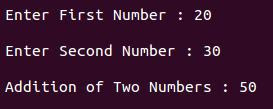
#include<iostream>
using namespace std;

class AddData          //Base Class
{
        protected:
                int num1, num2;
        public:
                void accept()
                {
                        cout<<"\n Enter First Number : ";
                        cin>>num1;
                        cout<<"\n Enter Second Number : ";
                        cin>>num2;
                }
};
class Addition: public AddData   //Class Addition – Derived Class
{
                int sum;
        public:
                void add()
                {
                        sum = num1 + num2;
                }
                void display()
                {
                        cout<<"\n Addition of Two Numbers : "<<sum;
                }
};
int main()
{
        Addition a;
        a.accept();
        a.add();
        a.display();
        return 0;
}

Output:

Multi-level inheritance :

#include<iostream>
using namespace std;

class AddData      //Base Class
{
    protected:
        int subjects[3], i;
    public:
        void accept_details()
        {
                cout<<"\n Enter Marks for Three Subjects ";
                cout<<"\n ------------------------------- \n";
                cout<<"\n English : ";
                cin>>subjects[0];
                cout<<"\n Maths : ";
                cin>>subjects[1];
                cout<<"\n History : ";
                cin>>subjects[2];
        }
};
//Class Total – Derived Class. Derived from class AddData and Base class of class Percentage
class Total : public AddData   
{
    protected:
        int total;
    public:
        void total_of_three_subjects()
        {
                total = subjects[0] + subjects[1] + subjects[2];
        }
};
class Percentage : public Total       //Class Percentage – Derived Class. Derived from class Total
{
    private:
        float per;
    public:
        void calculate_percentage()
        {
                per=total/3;
        }
        void show_result()
        {
                cout<<"\n ------------------------------- \n";
                cout<<"\n Percentage of a Student : "<<per;
        }
};
int main()
{
        Percentage p;
        p.accept_details();
        p.total_of_three_subjects();
        p.calculate_percentage();
        p.show_result();
        return 0;
}

Output:


Hierarchical Inheritance

#include <iostream> 
using namespace std;
class Side
{
protected:
int l;
public:
void set_values (int x)
            l=x;
        }
}; 
class Square: public Side
{
public:
int sq()
                return (l *l); 
        }
}; 
class Cube:public Side
{
public:
int cub()
                return (l *l*l); 
        }
}; 
int main ()
{
Square s;
s.set_values (10);
cout << "The square value is::" << s.sq() << endl;
Cube c;
c.set_values (20);
cout << "The cube value is::" << c.cub() << endl;
return 0;
}

Output
Total Objects: 1
The square value is:: 100
The cube value is::8000

Multiple Inheritance in C++


#include <iostream>
using namespace std;

class Base1 {
  public:
    Base1()
    {
      cout << "This is Base 1" << endl;
    }
};

class Base2 {
  public:
    Base2()
    {
      cout << "This is Base 2" << endl;
    }
};

class Child: public Base1, public Base2 {

};

int main()
{
    Child obj;
    return 0;
}


Hybrid Inheritance in C++ 

#include<iostream>
using namespace std;
int a,b,c,d,e;
class A    
{
protected:
public:
void getab()    
{
cout<<"\nEnter a and b value:";
cin>>a>>b;        
}
};
 
class B:public A    {
protected:
public:
void getc()    
{
cout<<"Enter c value:";
cin>>c;    
}
};
 
class C    
{
protected:
public:
void getd()    
{
cout<<"Enter d value:";
cin>>d;    
}
};
 
class D:public B,public C    
{
protected:
public:
void result()    
{
getab();    getc();
getd();    e=a+b+c+d;
cout<<"\n Addition is :"<<e; 
}
};
 
int main()    
{
D d1;
d1.result();
return 0;
}

Output
Total Objects: 1
Enter a and b value: 5 10
Enter c value: 15
Enter d value: 20

Addition is :50


netaji gandi Saturday, January 2, 2021
Data Structures through C++ Lab Exercise -3


Exercise -3 (Operator Overloading) 

a) Write a program to Overload Unary, and Binary Operators as Member Function, and Non Member Function. 

                 i) Unary operator as member function 

               ii) Binary operator as non member function 

b) Write a C ++ program to implement the overloading assignment = operator


Exercise -3 a-i)

Using a member function to overload an unary operator

Following program demonstrates overloading unary minus operator using a member function:

#include <iostream>
using namespace std;
class Number
{
private:
int x;
public:
Number(int x)
{
this->x = x;
}
void operator -()
{
x = -x;
}
void display()
{
cout<<"x = "<<x;
}
};
int main()
{
Number n1(10);
-n1;
n1.display();
return 0;
}

Output of the above program is as follows:

x = -10

When a friend function is used to overload an unary operator following points must be taken care of:
  • The function will take one operand as a parameter.
  • The operand will be an object of a class.
  • The function can access the private members only though the object.
  • The function may or may not return any value.
  • The friend function will not have access to the this
#include <iostream>
using namespace std;
class Number
{
private:
int x;
public:
Number(int x)
{
this->x = x;
}
friend Number operator -(Number &);
void display()
{
cout<<"x = "<<x<<endl;
}
};
Number operator -(Number &n)
{
return Number(-n.x);
}
int main()
{
Number n1(20);
Number n2 = -n1;
n2.display();
return 0;
}

Output of the above program is as follows:

x = -20;


Exercise -3 a-ii)
ii) Binary operator as non member function

#include <iostream>
using namespace std;
class Number
{
private:
int x;
public:
Number() {}
Number(int x)
{
this->x = x;
}
friend Number operator +(Number &, Number &);
void display()
{
cout<<"x = "<<x<<endl;
}
};
Number operator +(Number &n1, Number &n2)
{
Number temp;
temp.x = n1.x + n2.x;
return temp;
}
int main()
{
Number n1(20);
Number n2(10);
Number n3 = n1 + n2;
n3.display();
return 0;
}

Output of the above program is as follows:

x = 30

Following program demonstrates overloading the binary operator + using a member function:

#include <iostream>
using namespace std;
class Number
{
private:
int x;
public:
Number() {}
Number(int x)
{
this->x = x;
}
Number operator +(Number &n)
{
Number temp;
temp.x = x + n.x;
return temp;
}
void display()
{
cout<<"x = "<<x<<endl;
}
};
int main()
{
Number n1(20);
Number n2(10);
Number n3 = n1 + n2;
n3.display();
return 0;
}

Output of the above program is as follows:

x = 30


Exercise -3b
b) Write a C ++ program to implement the overloading assignment = operator

#include <iostream>
using namespace std;
class Number
{
private:
int x;
public:
Number(int p)
{
x = p;
}
Number operator =(Number &n)
{
return Number(n.x);
}
void display()
{
cout<<"x = "<<x;
}
};
int main()
{
Number n1(10);
Number n2 = n1;
n2.display();
return 0;
}

Output for the above program is as follows:

x = 10


netaji gandi
DATA STRUCTURES THROUGH C++ LAB R19 Exercise -2


DATA STRUCTURES THROUGH C++ LAB  R19

Exercise -2 (Access) 

Write a program for illustrating Access Specifiers public, private, protected 

a) Write a program implementing Friend Function 

b) Write a program to illustrate this pointer 

c) Write a Program to illustrate pointer to a class


Exercise -2a:-   Write a program implementing Friend Function 

#include <iostream>

using namespace std;

class A

{

protected:

int x;

public:

A(int p)

{

x = p;

}

};

class B : public A

{

private:

int y;

public:

B(int p, int q) : A(p)

{

y = q;

}

void show()

{

cout<<"x = "<<x<<endl;

cout<<"y = "<<y<<endl;

}

};

int main()

{

B obj(10, 20);

//Since show is public in class B, it is accessible in main function

obj.show(); //x is protected in A so it is accessible in B's show function

//y is not accessible in main as it is private to class B

//cout<<obj.y 

return 0;

}

Output for the above program is as follows:

x = 10

y = 20


Exercise -2b:-  Write a program to illustrate this pointer 

#include <iostream>

using namespace std;

class A

{

private:

int x;

int y;

public:

A(int x, int y)

{

this->x = x;

this->y = y;

}

void display()

{

cout<<"x = "<<x<<endl;

cout<<"y = "<<y<<endl;

}

A& clone()

{

return *this;

}

};

int main()

{

A obj1(10, 20);

obj1.display();

A obj2 = obj1.clone();

obj2.display();

return 0;

}

Output for the above program is as follows:

x = 10

y = 20

x = 10

y = 20

Exercise -2c:-Write a Program to illustrate pointer to a class

#include <iostream>

using namespace std;

class A

{

private:

int x;

int y;

public:

A(int x, int y)

{

this->x = x;

this->y = y;

}

void display()

{

cout<<"x = "<<x<<endl;

cout<<"y = "<<y<<endl;

}

};

int main()

{

A *ptr = new A(10, 30); //Here ptr is pointer to class A

ptr->display();

return 0;

}

Output for the above program is as follows:

x = 10

y = 30


netaji gandi
Object Oriented Programming through C++ LAB R19 (DS LAB)

                    Object Oriented Programming through C++ LAB R19 (DS LAB)

                                                  DS-LAB Exercise -1 to Exercise -5

Exercise -1 (Classes Objects) 

Create a Distance class with

  •  feet and inches as data members 
  •  member function to input distance
  •  member function to output distance 
  •  member function to add two distance objects 

a) Write a main function to create objects of DISTANCE class. Input two distances and output the sum. 

b) Write a C++ Program to illustrate the use of Constructors and Destructors (use the above program.) 

c) Write a program for illustrating function overloading in adding the distance between objects (use the above problem)

Exercise -1 a):-

#include <iostream>

using namespace std;

class Distance

{

private:

int feet;

int inches;

public:

void set_distance()

{

cout<<"Enter feet: ";

cin>>feet;

cout<<"Enter inches: ";

cin>>inches;

}

void get_distance()

{

cout<<"Distance is feet= "<<feet<<", inches= "<<inches<<endl;

}

void add(Distance d1, Distance d2)

{

feet = d1.feet + d2.feet;

inches = d1.inches + d2.inches;

feet = feet + (inches / 12);

inches = inches % 12;

}

};

int main()

{

Distance d1, d2, d3;

d1.set_distance();

d2.set_distance();

d3.add(d1, d2);

d3.get_distance();

return 0;

}

Input and output for the above program are as follows:

Enter feet: 3

Enter inches: 8

Enter feet: 4

Enter inches: 9

Distance is feet= 8, inches= 5


Exercise -1 b):-

Write a C++ Program to illustrate the use of Constructors and Destructors (use the above program.) 

#include <iostream>

using namespace std;

class Distance

{

private:

int feet;

int inches;

public:

Distance() {}

Distance(int f, int i)

{

feet = f;

inches = i;

}

void get_distance()

{

cout<<"Distance is feet= "<<feet<<", inches= "<<inches<<endl;

}

void add(Distance &d1, Distance &d2)

{

feet = d1.feet + d2.feet;

inches = d1.inches + d2.inches;

feet = feet + (inches / 12);

inches = inches % 12;

}

~Distance()

{

cout<<"Distance object destroyed"<<endl;

}

};

int main()

{

int f1, in1, f2, in2;

cout<<"Enter feet: ";

cin>>f1;

cout<<"Enter inches: ";

cin>>in1;

cout<<"Enter feet: ";

cin>>f2;

cout<<"Enter inches: ";

cin>>in2;

Distance d1(f1, in1);

Distance d2(f2, in2);

Distance d3;

d3.add(d1, d2);

d3.get_distance();

return 0;

}

Input and output for the above program are as follows:

Enter feet: 3

Enter inches: 8

Enter feet: 4

Enter inches: 9

Distance is feet= 8, inches= 5

Distance object destroyed

Distance object destroyed

Distance object destroyed

Exercise -1 c):-

Write a program for illustrating function overloading in adding the distance between objects (use the above problem)

#include <iostream>

using namespace std;

class Distance

{

private:

int feet;

int inches;

public:

void set_distance()

{

cout<<"Enter feet: ";

cin>>feet;

cout<<"Enter inches: ";

cin>>inches;

}

void get_distance()

{

cout<<"Distance is feet= "<<feet<<", inches= "<<inches<<endl;

}

void add(Distance d1, Distance d2)

{

feet = d1.feet + d2.feet;

inches = d1.inches + d2.inches;

feet = feet + (inches / 12);

inches = inches % 12;

}

void add(Distance *d1, Distance *d2)

{

feet = d1->feet + d2->feet;

inches = d1->inches + d2->inches;

feet = feet + (inches / 12);

inches = inches % 12;

}

};

int main()

{

Distance d1, d2, d3;

d1.set_distance();

d2.set_distance();

d3.add(d1, d2);

d3.get_distance();

d3.add(&d1, &d2);

d3.get_distance();

return 0;

}

Input and output for the above program are a follows:

Enter feet: 3

Enter inches: 4

Enter feet: 4

Enter inches: 9

Distance is feet= 8, inches= 1

Distance is feet= 8, inches= 1

netaji gandi

OBJECT ORIENTED PROGRAMMING USING JAVA LAB

Java Programming Lab Experiments VR-23 2025-26 Java Programming Lab Experiments Experiment 1: Fibonacci Sequence The F...