JNTUK R20 Object Oriented Programming through Java (OOPS through JAVA) I-II-ECE


JNTUK R20

Object Oriented Programming through Java


Course Objectives: This course is designed to:

  • The analytical skills of object oriented programming
  • Overall development of problem solving and critical analysis.
  • Formal introduction to Java programming language

UNIT-1

Introduction to Java : Basics of Java programming, Data types, Variables, Operators, Control structures including selection, Looping, Java methods, Overloading, Math class, Arrays in java. Objects and Classes : Basics of objects and classes in java, Constructors, Finalizer, Visibility modifiers, Methods and objects, Inbuilt classes like String, Character, StringBuffer, File, this reference.

                                                OOPS through JAVA UNIT 1 MATERIAL       


Unit-2

Inheritance and Polymorphism : Inheritance in java, Super and sub class, Overriding, Object class, Polymorphism, Dynamic binding, Generic programming, Casting objects, Instance of operator, Abstract class, Interface in java, Package in java, UTIL package.

                                             OOPS through JAVA UNIT 2 MATERIAL   


Unit-3

Event and GUI programming : Event handling in java, Event types, Mouse and key events, GUI Basics, Panels, Frames, Layout Managers: Flow Layout, Border Layout, Grid Layout, GUI components like Buttons, Check Boxes, Radio Buttons, Labels, Text Fields, Text Areas, Combo Boxes, Lists, Scroll Bars, Sliders, Windows, Menus, Dialog Box, Applet and its life cycle, Introduction to swing, Creating a swing applet, swing controls and components.

OOPS through JAVA UNIT 3-PART-1 MATERIAL

Event Handling Event handling in java, Event types, Mouse and key events


Unit-4

I/O programming: Text and Binary I/O, Binary I/O classes, Object I/O, Random Access Files. Event driven model, handling events

Unit-5

Multithreading in java: Thread life cycle and methods, Runnable interface, Thread synchronization, Exception handling with try-catch-finally, Collections in java, Introduction to JavaBeans and Network Programming.

netaji gandi Wednesday, June 2, 2021
R19 JAVA PROGRAMMING LAB

 R19 JAVA PROGRAMMING LAB

Exercise - 1 (Basics)

a) Write a JAVA program to display default value of all primitive data type of JAVA

Program:

class DefaultValues
{
byte b;
short s;
int i;
long l;
float f;
double d;
char c;
boolean bl;
String s;
public static void main(String[] args)
{
DefaultValues df=new DefaultValues();
System.out.println("Byte :"+df.b);
System.out.println("Short :"+df.s);
System.out.println("Int :"+df.i);
System.out.println("Long :"+df.l);
System.out.println("Float :"+df.f);
System.out.println("Double :"+df.d);
System.out.println("Char :"+df.c);
System.out.println("Boolean :"+df.bl);
System.out.println("String :"+df.s);
}
}

Output:


b) Write a java program that display the roots of a quadratic equation ax2+bx+c=0. Calculate the discriminate D and basing on value of D, describe the nature of root.


NOTE:
The java.lang.Math class contains methods for performing basic numeric operations such as the elementary exponential, logarithm, square root, and trigonometric functions.

Program:

//Java Program to Find Roots of a Quadratic Equation
import java.util.Scanner;
class Quadratic
{
public static void main(String[] args)
{
//double a = 2.3, b = 4, c = 5.6;
double a,b,c;
System.out.println("Enter a,b,c values:");
Scanner scan=new Scanner(System.in);
a=scan.nextFloat();
b=scan.nextFloat();
c=scan.nextFloat();
double root1, root2;
double determinant = b * b - 4 * a * c;
// condition for real and different roots
if(determinant > 0)
{
root1 = (-b + Math.sqrt(determinant)) / (2 * a);
root2 = (-b - Math.sqrt(determinant)) / (2 * a);
System.out.format("root1 = %.2f and root2 = %.2f", root1 , root2);
System.out.println("\nRoots are real and different");
}
// Condition for real and equal roots
else if(determinant == 0)
{
root1 = root2 = -b / (2 * a);
System.out.format("root1 = root2 = %.2f;", root1);
System.out.println("\nRoots are real and equal");
}
// If roots are not real
else
{
double realPart = -b / (2 *a);
double imaginaryPart = Math.sqrt(-determinant) / (2 * a);
System.out.format("root1 = %.2f+%.2fi and root2 = %.2f-%.2fi",realPart, imaginaryPart, realPart, imaginaryPart);
System.out.println("\nRoots are imaginary"); //complex and different
}
}
}

Output:


c) Five Bikers Compete in a race such that they drive at a constant speed which may or may not be the same as the other. To qualify the race, the speed of a racer must be more than the average speed of all 5 racers. Take as input the speed of each racer and print back the speed of qualifying racers.

Program:

import java.util.*;
  class Race
  {
            public static void main(String a[]) 
            {
                     int r1,r2,r3,r4,r5,avg;
                     Scanner s=new Scanner(System.in);
                     System.out.println("enter the speed of the r1 r2 r3 r4 and r5");
                     r1=s.nextInt();
                     r2=s.nextInt();
                     r3=s.nextInt();
                     r4=s.nextInt();
                     r5=s.nextInt();
                     avg=(r1+r2+r3+r4+r5)/5;
                     if(r1>avg)
                     {
                               System.out.println("first racer is qualified with a race speed "+r1+"\n");
                     }
                     else if(r2>avg)
                     {
                               System.out.println("second racer is qalified with a race speed "+r2);
                     }
                     else if(r3>avg)
                     {
                               System.out.println("third racer is qalified with a race speed "+r3);
                     }
                     else if(r4>avg)
                     {
                               System.out.println("fourth racer is qalified with a race speed "+r4);
                     }
                     else if(r5>avg)
                     {
                               System.out.println("fifth racer is qalified with a race speed "+r5);
                     }
                     else
                     {
                               System.out.println("no biker is qualified");
                     }
            }
  }

Output:


netaji gandi
JDK Installation


JDK Installation


 Download Java Development Kit 16 (JDK 16) from this link.


In this tutorial I will be installing JDK 16 as this also installs JRE 16.


System specification:

Operating System: Windows 64-bit operating system, x64-based processor

Processor: Intel core i3 64 bit

Step – 1:

Double click the jdk-8u25-windows-x64.exe icon as shown in the below screen shot:


Step – 2:

The first screen you will see is the setup welcome screen as shown in the below screen shot. Click Next button.


Step – 3:

In the next screen you will see custom options like selecting the necessary features and the path at which we want to install JDK8. Leave them in their default settings and click Next button as shown in the below screenshot:


Step – 4:

In the next screen you can select the path at which JRE8 can be installed. Leave it at its default path and click on Next button as shown in the below screenshot:


Step – 5:

In the next screen you can observe the installation progress (green bar) as shown in the below screenshot:


Step – 6:

Next you will see the installation completion screen. Click on Close button as shown in the below screenshot:


That’s it! You have installed JDK8 successfully on your machine. ðŸ™‚


netaji gandi
Exercise -4 (Inheritance)

 Exercise -4 (Inheritance):

a) Write C++ Programs and incorporating various forms of Inheritance

          i) Single Inheritance

          ii) Hierarchical Inheritance 

          iii) Multiple Inheritances 

          iv) Multi-level inheritance 

          v) Hybrid inheritance 

b) Also illustrate the order of execution of constructors and destructors in inheritance


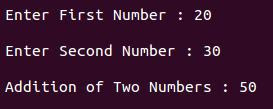
i) Single Inheritance

#include<iostream>
using namespace std;

class AddData          //Base Class
{
        protected:
                int num1, num2;
        public:
                void accept()
                {
                        cout<<"\n Enter First Number : ";
                        cin>>num1;
                        cout<<"\n Enter Second Number : ";
                        cin>>num2;
                }
};
class Addition: public AddData   //Class Addition – Derived Class
{
                int sum;
        public:
                void add()
                {
                        sum = num1 + num2;
                }
                void display()
                {
                        cout<<"\n Addition of Two Numbers : "<<sum;
                }
};
int main()
{
        Addition a;
        a.accept();
        a.add();
        a.display();
        return 0;
}

Output:

Multi-level inheritance :

#include<iostream>
using namespace std;

class AddData      //Base Class
{
    protected:
        int subjects[3], i;
    public:
        void accept_details()
        {
                cout<<"\n Enter Marks for Three Subjects ";
                cout<<"\n ------------------------------- \n";
                cout<<"\n English : ";
                cin>>subjects[0];
                cout<<"\n Maths : ";
                cin>>subjects[1];
                cout<<"\n History : ";
                cin>>subjects[2];
        }
};
//Class Total – Derived Class. Derived from class AddData and Base class of class Percentage
class Total : public AddData   
{
    protected:
        int total;
    public:
        void total_of_three_subjects()
        {
                total = subjects[0] + subjects[1] + subjects[2];
        }
};
class Percentage : public Total       //Class Percentage – Derived Class. Derived from class Total
{
    private:
        float per;
    public:
        void calculate_percentage()
        {
                per=total/3;
        }
        void show_result()
        {
                cout<<"\n ------------------------------- \n";
                cout<<"\n Percentage of a Student : "<<per;
        }
};
int main()
{
        Percentage p;
        p.accept_details();
        p.total_of_three_subjects();
        p.calculate_percentage();
        p.show_result();
        return 0;
}

Output:


Hierarchical Inheritance

#include <iostream> 
using namespace std;
class Side
{
protected:
int l;
public:
void set_values (int x)
{ 
            l=x;
        }
}; 
class Square: public Side
{
public:
int sq()
{ 
                return (l *l); 
        }
}; 
class Cube:public Side
{
public:
int cub()
{ 
                return (l *l*l); 
        }
}; 
int main ()
{
Square s;
s.set_values (10);
cout << "The square value is::" << s.sq() << endl;
Cube c;
c.set_values (20);
cout << "The cube value is::" << c.cub() << endl;
return 0;
}

Output
Total Objects: 1
The square value is:: 100
The cube value is::8000

Multiple Inheritance in C++


#include <iostream>
using namespace std;

class Base1 {
  public:
    Base1()
    {
      cout << "This is Base 1" << endl;
    }
};

class Base2 {
  public:
    Base2()
    {
      cout << "This is Base 2" << endl;
    }
};

class Child: public Base1, public Base2 {

};

int main()
{
    Child obj;
    return 0;
}


Hybrid Inheritance in C++ 

#include<iostream>
using namespace std;
int a,b,c,d,e;
class A    
{
protected:
public:
void getab()    
{
cout<<"\nEnter a and b value:";
cin>>a>>b;        
}
};
 
class B:public A    {
protected:
public:
void getc()    
{
cout<<"Enter c value:";
cin>>c;    
}
};
 
class C    
{
protected:
public:
void getd()    
{
cout<<"Enter d value:";
cin>>d;    
}
};
 
class D:public B,public C    
{
protected:
public:
void result()    
{
getab();    getc();
getd();    e=a+b+c+d;
cout<<"\n Addition is :"<<e; 
}
};
 
int main()    
{
D d1;
d1.result();
return 0;
}

Output
Total Objects: 1
Enter a and b value: 5 10
Enter c value: 15
Enter d value: 20

Addition is :50


netaji gandi Saturday, January 2, 2021

Week 09 Programming Assignments 1-5

  W09 Programming Assignments 1 Due date on 2026-09-24, 23:59 IST Your last recorded submission was on 2026-09-14, 13:43 IST. Q. Write suita...